Issues
This is where triage happens: the project home at /p/:projectId/issues. When rules fire first, open the Alerts rail: Alerts.
What is an issue?
A group of exception events that share a fingerprint. The Issues list is the project home.
Until the first event lands, Setup (/p/:projectId/setup) walks a DSN checklist. Empty state: 0 UNRESOLVED EXCEPTIONS. First capture: Quickstart.
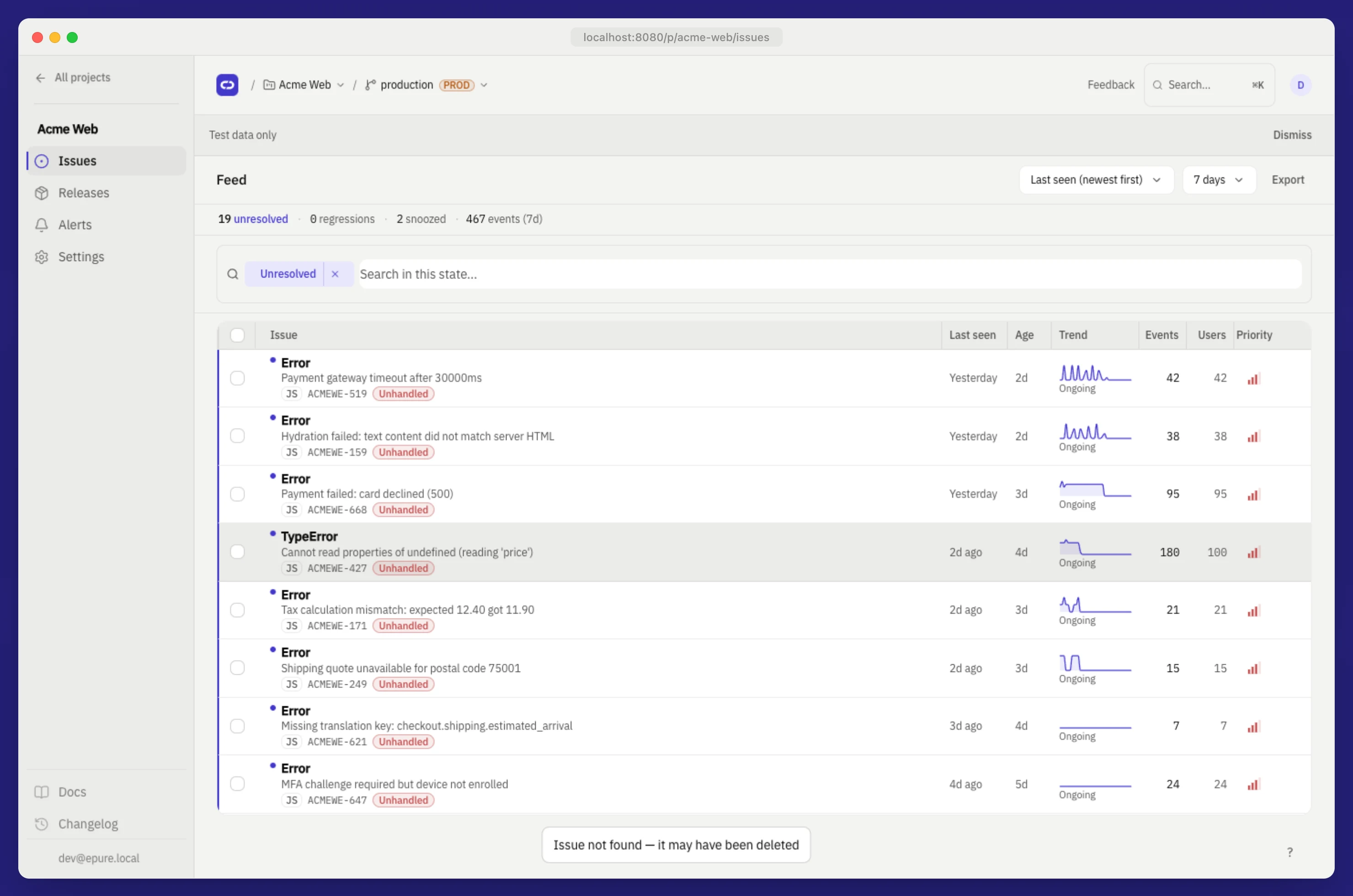
The Issues list
Master-detail: filterable rows on the left, detail on the right. Keyboard j/k/e/i triages without the mouse.
- Left: filterable issue rows (status, title, counts, last seen)
- Right / overlay: detail for the focused or opened issue
Default query: is:unresolved. Filters live in the URL:
/p/{projectId}/issues?q=is:unresolved+env:production&window=7d

Deep-link the environment chip with `?environment=local` (or `staging` / `production`). The list API also accepts `environment=` alongside `q=`.
Query tokens
Type in search (/ focuses it) or use filter chips.
| Token | Meaning |
|---|---|
is:unresolved | Open / active |
is:resolved | Marked resolved |
is:ignored | Ignored |
is:snoozed | Temporarily muted |
is:regression | Came back after resolve-in-release |
env:production | Environment tag |
release:my-app@1.2.0 | Events tagged with that release |
level:error / level:warning | Event level |
user.email:*@example.com | User email match |
| free text | Substring on title / message |
Time windows: 24h, 7d (default), 14d, 30d, 90d. Sort defaults to last seen.
Keyboard
| Key | Action |
|---|---|
j / k | Move focus down / up |
Alt+K | Open detail for focused row |
e | Resolve focused issue |
i | Ignore focused issue |
x | Toggle multi-select |
/ | Focus search |
Esc | Close detail or clear selection |
⌘⇧C / Ctrl+Shift+C | Copy LLM-ready Markdown export |
1–4 | Detail tabs |
? | Toggle shortcut hints |
Shortcuts ignore keystrokes when focus is in an input.
What is on issue detail?
Tabs for overview, stack, breadcrumbs, occurrences, fingerprint, and merged children.
- Stack trace: demangled when JS/TS source maps exist for the release, otherwise raw frames
- Breadcrumbs: filterable trail (
All, HTTP, console, errors) - Occurrences: recent events; pick two for a diff
- Release diff: same fingerprint across two versions
- Export: sanitized Markdown for an AI assistant (same class of output as MCP
epure_issue_contextorepure-cli context … --format markdown: MCP and epure-cli)
Triage
| Action | Behavior |
|---|---|
| Resolve | Status → resolved. Optional: resolve in a release so a later version with the same fingerprint becomes a regression |
| Ignore | Hide from unresolved feed |
| Reopen | Return to unresolved |
| Snooze | Mute for 4 hours, 100 more occurrences, or 10 more users |
| Merge | Multi-select (≥2) → merge into the selected parent |
| Split | Undo merge for children |
| Bulk | Resolve / ignore / snooze / delete on the selection |
Members can triage. Project and DSN admin needs Admin or Owner: see Settings.
How does grouping work?
A deterministic SHA-256 fingerprint from normalized exception type plus the sanitized top in-app stack frame.
Same type and frame land on one issue. SDK fingerprint overrides are honored. Merge and split handle stacks that share a root cause but differ slightly.
Full ingest to fingerprint flow: Concepts. HTTP: Issues API.
Issue missing after 202?
Match the environment chip to the SDK environment tag; seed examples use local. Confirm you opened the project that owns the DSN. Accept is non-blocking, so wait about a second, then check docker compose logs epure. See Verify.
Why did two similar crashes become two issues?
Default grouping uses exception type plus the top in-app frame. A different file, function, or relative line yields a new fingerprint. Merge the selected issues into a parent, or set an SDK fingerprint override; split undoes a merge. See Issues API.
What is a regression?
Resolve an issue in a release (for example my-app@1.4.0). If the same fingerprint arrives in a newer release, status flips to regression (is:regression) and matching webhooks can fire. Snooze is separate: mute by time, occurrence count, or unique users. See Releases.